



Buying Guide
How to Buy a Gaming Monitor
A short, practical guide to choosing a gaming monitor. Covers the most important factors, the main types available, the specifications that matter, where to buy and common pitfalls so you can decide quickly and confidently.
What to consider and the main types
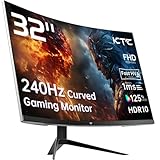
Decide your primary use first - competitive gaming, immersive single player, or mixed work and play. Size and resolution matter together: 24 inches at 1080p gives high pixel density for desk use, 27 inches works well at either 1080p or 1440p, and 32 inches usually suits 1080p for a more cinematic view. Panel types trade off between speed and contrast - IPS gives wide viewing angles and colour accuracy, VA delivers deeper blacks and higher contrast, and newer fast-IPS panels aim to combine speed with good colour. Curved screens increase immersion at larger sizes but are not essential for high-precision competitive play. Finally match refresh rate and response time to your hardware - modern monitors advertise 180Hz to 240Hz and 1ms response times, but your graphics card must be able to feed frames to benefit from very high refresh rates.


Key features and specs to check
Focus on these measurable items when comparing models.
- Resolution and size - pick a resolution that gives comfortable pixel density at your desk distance.
- Refresh rate and response time - higher refresh and lower response reduce motion blur and input lag; check whether the 1ms claim is MPRT or GtG.
- Panel type - IPS for colour and viewing angles, VA for contrast, fast-IPS for a balance of both.
- Colour and HDR - look for coverage numbers (sRGB, DCI-P3) and Delta E where listed; HDR400 or HDR10 means brighter highlights but check real brightness (250 to 450 cd/m2 reported across models).
- Adaptive sync - FreeSync or G-Sync compatibility prevents tearing; useful if your GPU fluctuates in frame rate.
- Connectivity - ensure DisplayPort 1.2/1.4 and HDMI 2.0/1.4 are present if you plan console and PC use; some monitors include a DisplayPort which is best for high refresh QHD.
- Ergonomics and fit - tilt, VESA 100x100 compatibility and stand adjustability matter for long sessions.
- Extras - built-in speakers are convenient but often low wattage; included cables and the ability to overclock refresh rate can be useful.
Where to buy and mistakes to avoid
Online retailers usually offer the best prices and wider selection, while retail stores let you inspect the panel and test for uniformity and dead pixels. Before buying, check delivery returns, warranty terms and the seller reputation.
- Do not assume marketing specs reflect real performance; read user reviews and professional tests for input lag and colour accuracy.
- Do not buy a high refresh 1440p panel without checking your GPU can sustain the frame rates you need.
- Do not overlook ports and cables - some high-refresh modes require DisplayPort and supplied HDMI may not support top refresh rates.
- Do not rely on tiny built-in speakers for immersive sound; plan for a headset or external speakers if audio matters.
- Test the panel quickly on arrival for dead pixels, backlight bleed and uneven colour, and keep original packaging in case of return.

Expert tips and quick checklist
Short, actionable advice to speed your decision.
- Match resolution to screen size and viewing distance - 27 inches is the sweet spot for 1440p; 24 inches for competitive 1080p.
- Prefer DisplayPort for high refresh QHD, HDMI 2.0 is fine for most 1080p setups.
- If you game in dark scenes, choose higher brightness and HDR400 for better detail.
- For colour work choose a panel with high sRGB/DCI-P3 coverage and low Delta E; for esports choose the lowest input lag and fastest response available.
- Use a VESA arm for better ergonomics and to free desk space if you plan multi-monitor setups.
- Budget guide: entry competitive 1080p high-refresh options start low, mid-range 27 inch QHD models sit around mid-price, and larger or higher specification panels command a premium.
Final Thoughts
Decide on the single most important factor for you - speed, image quality or size - then use the checklist to confirm ports, ergonomics and warranty. Buy where you can return easily if the panel has issues, and match your GPU to the monitor's resolution and refresh rate for the best value and performance.


