


Buying Guide
How to Buy an Ink-tank All-in-One Printer
This short guide helps you pick an ink-tank all-in-one printer for home or family use. It covers the key buying factors, the main types available, the essential features and specs to check, where to buy and common mistakes to avoid, plus expert tips to get the best value.
Key factors to consider
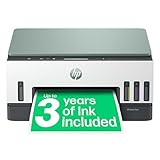
Decide your monthly page volume first. Ink-tank models shine for high-volume printing because many include enough ink for up to 3 years and very low running costs.
- Monthly use: occasional, moderate, or heavy. Match capacity to avoid wasted expense.
- Print quality needs: crisp text is easy; look for good colour graphics if you print photos.
- Running cost: check included ink yield and claimed pages. Typical yields in the market include examples such as up to 8,000 colour pages or 12,000 black pages, or alternatives like 4,500 black and 7,500 colour.
- Space and placement: measure before buying; some units have rear paper trays or top-loading trays that need clearance.


Types and important features to check
Know the main variants: single-function ink-tank printers and all-in-one models that print, scan and copy. Important features to look for include:
- Refill system: prefer spill-free, keyed bottles and a visible ink-level window to avoid mix-ups and mess.
- Connectivity: Wi-Fi and Wi-Fi Direct let you print from phones and tablets; an app that handles setup and troubleshooting is a bonus.
- Duplex printing: automatic 2-sided printing saves paper and is useful for reports.
- Print speed and quality: expect a range from around 10 ppm to 15 ppm for black, and lower for colour. If you print photos, look for borderless photo support (eg 10x15cm).
- Build and longevity: look for heat-free or clog-resistant printhead technology and clear statements about printhead life.
- Security and software: basic encryption and password protection help if the printer joins your home network.
Where to buy and mistakes to avoid
Buy online for better deals and to compare included ink packages, but check seller ratings and warranty terms. In-store buying is useful if you want a hands-on look or help with setup.
- Do not buy based only on low upfront price. Factor in included ink yield and true cost per page.
- Do not assume third-party inks will give the same savings. Some machines rely on manufacturer bottles and keyed fills.
- Check for duplex, scanner features and paper capacity if you need them. Missing features are hard to add later.
- Read return and warranty policies before purchase, and keep proof of purchase when you register the product.

Expert tips and quick checklist
Practical steps to buy smart and save money:
- Match model capacity to your expected monthly pages. If you print a lot, pick a model with higher included-yield ink.
- Choose spill-free keyed refill systems and a front ink-level display to make maintenance simple.
- Prefer models with reliable Wi-Fi and an official app for mobile printing and troubleshooting.
- Keep a spare set of bottles once you know your usage pattern; bulk purchases often lower cost per page.
- Use economy or draft mode for everyday documents to stretch ink, and switch to high-quality mode for photos and final copies.
Final Thoughts
Ink-tank all-in-one printers give very low running costs and good capacity for family or home office use. Focus on monthly volume, the refill system, included ink yield and connectivity when you choose. Buy from a reputable seller, check warranty and return terms, and follow the quick checklist to get the best long-term value.